TL;DR
- The Model Context Protocol (MCP) is an open standard, introduced by Anthropic in November 2024, for connecting AI assistants to the systems where data lives.
- In accounting, the useful jobs are reading and explaining: what's in the trial balance, what the VAT position looks like, which lines look odd.
- The rule we recommend: let the assistant prepare, and keep posting with a person. In ISAFlow, draft journals stay unposted for you to review, and the agent can only post if you grant a separate posting permission.
- ISAFlow's MCP connector is a pilot, off by default for each company. Contact ISAFlow support to enable it. Access is limited per company, every AI request is logged, and posting needs a separate permission the business chooses to grant. We recommend keeping posting with a person.
Why this question is coming up now
Plenty of bookkeepers have tried pasting a trial balance into an AI chat to ask "what's going on here?" It works, sort of. It also means copying client data into a tool with no link back to the books, no audit trail and no idea whether the numbers are current.
MCP is a cleaner answer. Instead of copying data out, you let an assistant connect to the accounting system directly, with the access you choose.
What MCP actually is
Anthropic introduced the Model Context Protocol on 25 November 2024 as "a new standard for connecting AI assistants to the systems where data lives" (Anthropic). It's open-source. The architecture is simple:
- An MCP server exposes data and actions from a system, such as an accounting package.
- An MCP client is the AI application that connects to it, such as Claude, Cursor or Grok Bot.
- The server decides what the client can see and do.
That last point is the whole game. The protocol doesn't make an assistant trustworthy. The permissions on the server do.
What an assistant should do in your books
The best uses are the ones where a mistake costs you a few minutes, not a SARS penalty.
Reading and explaining
- "Summarise the trial balance at 30 September and flag anything unusual compared with August."
- "What's our VAT position for the current period, and what are the five biggest input tax claims?"
- "Which customers are more than 60 days overdue?"
These are questions a bookkeeper answers every week. An assistant can get to a first draft in seconds, and a person can check it.
Preparing, not posting
- "Draft the month-end accrual journal for the audit fee."
- "Prepare a journal to reclassify the R12 400 in suspense to repairs and maintenance."
The assistant prepares a draft. It stays unposted for you to review. The agent can only post if you grant a separate posting permission, and we recommend keeping posting with a person.
What an assistant shouldn't do
- Skip the review. Whoever prepares an entry, a person should review it before it's posted. That's basic segregation of duties, and it applies to software as much as to people.
- File returns. A VAT201 or EMP201 is a declaration to SARS. A registered person should review and submit it. See the VAT201 guide and the EMP201 guide for what's at stake.
- See more than it needs. Access should be per company and limited to the task.
Why the VAT position is a good first question
VAT is where small errors turn into big numbers. In 2024/25, SARS collected R561.4 billion in domestic VAT payments and paid R365.5 billion in refunds, from 496 858 active vendors out of 900 285 registered (SARS Tax Statistics 2025).
| Label | Domestic VAT payments and VAT refunds, 2024/25 (R billion) |
|---|---|
| Domestic VAT payments | R561.4 |
| VAT refunds | R365.5 |
Source: SARS Tax Statistics 2025. Accessed 27 October 2026.
Every one of those returns started with a position someone checked. An assistant that can read the ledger and say "input tax is up 40% on last period, mostly from three invoices" gives the reviewer a head start. It doesn't replace the review.
The controls to insist on
Whatever accounting system you use, ask these questions before you connect an assistant.
1. Is it read-only by default?
Reading is low-risk. Writing isn't. Start read-only, and only add more when you have a reason.
2. Does a person review before anything is posted?
Drafts are fine. We recommend that posting stays a person's decision, after review. In ISAFlow, posting needs a permission you choose to grant. Check which permissions the connection asks for, and grant only the ones you need.
3. Is access per company?
For a practice running many clients, an assistant connected to one client must not be able to see another.
4. Is there an audit trail?
There should be a record of what the assistant did, and a way to cut it off. In ISAFlow, every AI request is logged in an append-only audit log. You can list the drafts an assistant has created, and revoke its access at any time.
5. What about POPIA?
Your books hold personal information about employees and customers. The Protection of Personal Information Act requires reasonable security safeguards (section 19), and a written contract with any operator that processes personal information for you (section 21) (POPIA, gov.za). Check what the AI provider does with the data it receives, and whether that fits your contracts with clients.
How ISAFlow's MCP connector works
ISAFlow's MCP connector is a pilot, and it's off by default for each company. To switch it on, contact ISAFlow support to enable it. Access is limited to that company, and posting needs a separate permission the business chooses to grant.
With it, an assistant such as Claude, Cursor or Grok Bot can:
- read the trial balance,
- check the VAT position,
- prepare a draft journal, if you grant the
write:journalspermission when you connect, - post a journal, only if you grant a separate posting permission.
Access is limited per company. Draft journals stay unposted for you to review, and the agent can only post if the business grants a separate posting permission. We recommend keeping posting with a person.
Every AI request is logged in an append-only audit log. You can list the drafts an assistant has created, and revoke its access when you no longer need it.
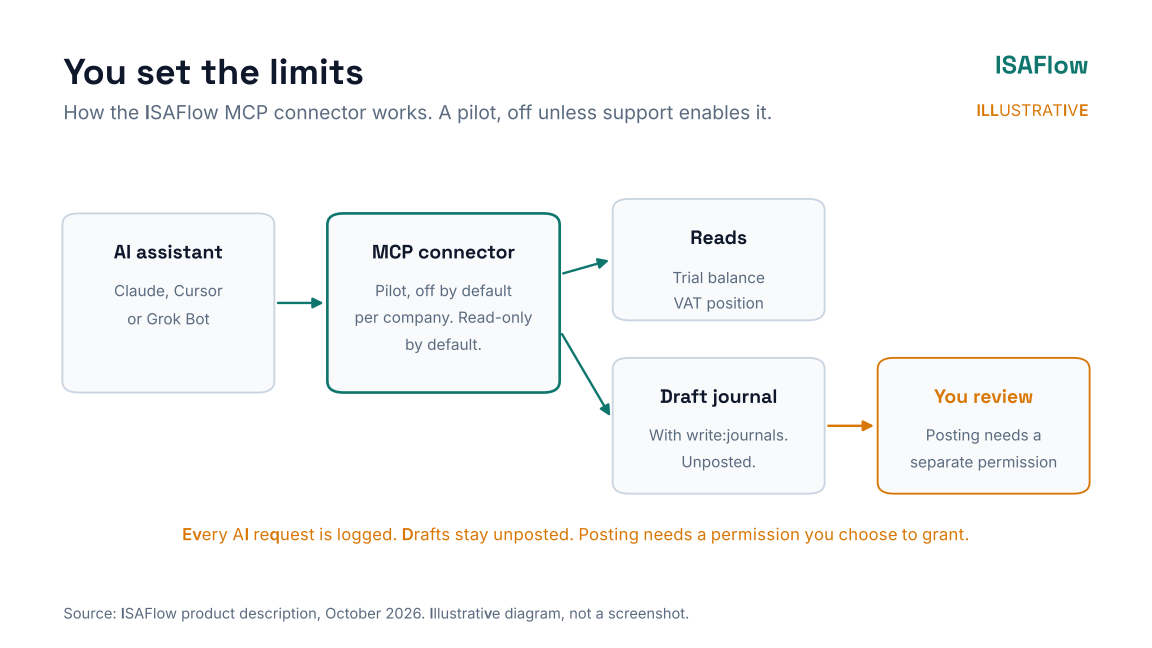
Illustrative diagram, not a screenshot.
The rest of ISAFlow follows the same idea: categorisation is rule-based, with optional AI. Auto-match is one click. Document capture prepares a draft entry for you to check. Each company's books are kept separate. Accounting practices get a bureau dashboard across all their clients, set up with you during onboarding.
Getting started safely
- Pick one company with clean books and a reconciled bank. Our bank reconciliation routine helps.
- Start read-only. Ask questions you already know the answers to, and check them.
- Write down what works. Which prompts are useful, which aren't.
- Then try drafts. Grant
write:journalsonly when you're ready, and review every draft before it's posted. We recommend keeping posting with a person. - For a practice, roll out client by client. See how to grow a bookkeeping and payroll bureau.
To try it, start a free trial, then contact ISAFlow support to enable the MCP connector pilot for your company. To see ISAFlow first, contact us for a demo.
FAQ
What is MCP in accounting?
The Model Context Protocol is an open standard for connecting AI assistants to software. In accounting, it lets an assistant read data such as the trial balance directly from the system, with permissions the system controls.
Can an AI assistant create journals in ISAFlow?
Access is limited per company. Draft journals stay unposted for you to review, and the agent can only post if the business grants a separate posting permission. We recommend keeping posting with a person.
Which AI assistants work with ISAFlow?
Claude, Cursor and Grok Bot can connect through ISAFlow's MCP connector once ISAFlow support has enabled the pilot for your company.
Is it safe to connect AI to my accounting software?
It can be, if access is off until you ask for it, limited per company, and posting needs a permission the business chooses to grant. We recommend keeping posting with a person. Check the AI provider's data handling against your POPIA obligations.
Can AI file my VAT return?
It shouldn't. An assistant can help check the VAT position, but a person should review and submit the return to SARS.
Sources
All accessed 27 October 2026.
- Anthropic: Introducing the Model Context Protocol, 25 November 2024
- SARS: Tax Statistics 2025
- South African Government: Protection of Personal Information Act 4 of 2013
This article is general information, not tax, legal or accounting advice.