TL;DR
- The hardest part of leaving desktop accounting isn't the ledger. It's payroll, because year-to-date figures feed every employee's IRP5.
- Pick your cutover month before you pick your software. Switch payroll at the start of a tax year, 1 March, and keep clear of the EMP501 reconciliations.
- Bring across opening balances, open invoices, customers and suppliers. Start payroll fresh on 1 March, so there's no year-to-date to carry across. Leave the detailed history in the old system, kept accessible for five years.
- Check where your new provider stores data. SARS needs to authorise electronic records kept outside South Africa, and POPIA requires a written contract with anyone who processes personal information for you.
Why people move, and what makes them stall
Plenty of South African businesses still run accounting on a desktop package, sometimes a version of Sage Pastel installed years ago, sometimes something older. The reasons to move are familiar: one machine holds the books, backups depend on one person, the bookkeeper can't work from home, and the accountant gets a file copy once a year.
The reason people stall is fear of breaking something. Usually that something is payroll. Get the ledger slightly wrong and you post a correcting journal. Get payroll year-to-date wrong and an employee's IRP5 is wrong, the EMP501 doesn't reconcile, and the problem lands with SARS.
So this plan is built around payroll first.
Step 1: Pick the cutover month
Your cutover month is when the new system becomes the system of record. Choose it around the SARS payroll calendar, not around when the sales rep calls.
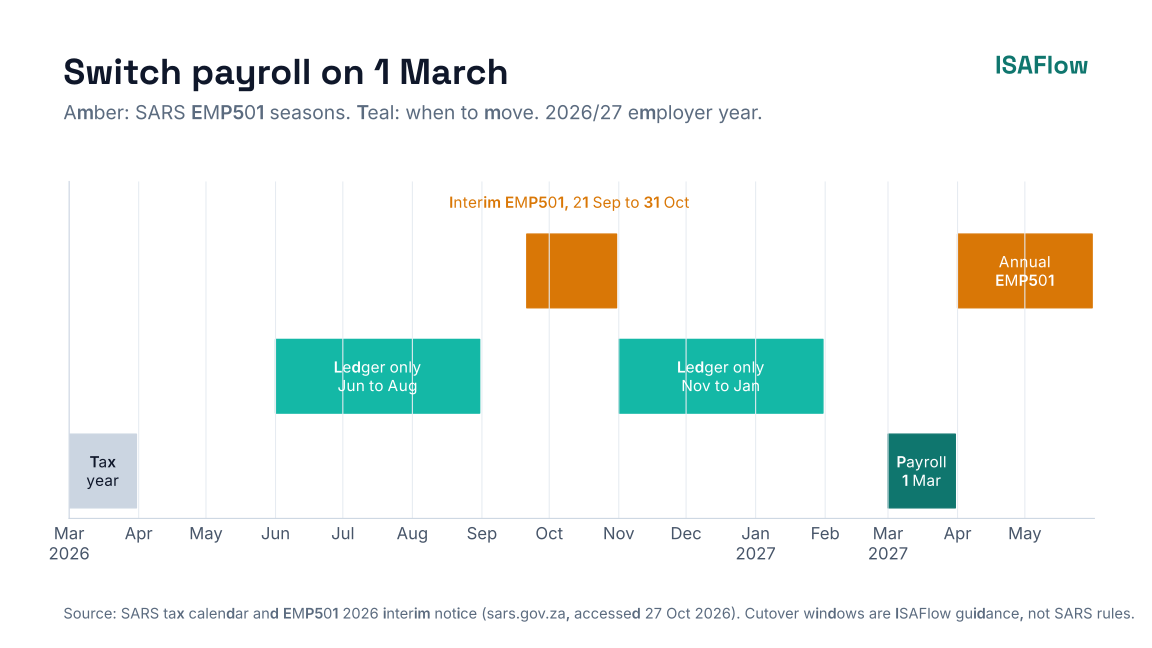
SARS dates from the SARS tax calendar and the 2026 interim EMP501 notice. Suggested cutover windows are ISAFlow guidance, not a SARS rule.
The reasoning:
- Switch payroll on 1 March. The tax year starts on 1 March, so payroll year-to-date figures start at zero and nothing has to come across. With ISAFlow, this is the route we recommend. It can't import prior year-to-date figures or employees, and PAYE year-to-date builds only from pay runs done in ISAFlow.
- Avoid the EMP501 windows. The interim reconciliation runs from 21 September to 31 October in 2026 (SARS) and the annual one runs from April to the end of May (SARS tax calendar). You want the old system to do the reconciliation it holds the data for.
- Moving the ledger earlier? June to August, after the annual reconciliation, and November to January, after the interim one, are good windows for the ledger. Keep running payroll in the old system until the tax year ends, then switch payroll on 1 March.
If you also want a VAT-clean break, move at the start of a VAT period. For a Category A vendor that's the first day of February, April, June, August, October or December (SARS VAT tax periods).
Step 2: Decide what to bring across
You don't have to migrate everything. In most cases you shouldn't.
Bring across
- Opening trial balance at the cutover date, from a closed, reviewed month.
- Open customer invoices and open supplier invoices, so you can age debtors and creditors and allocate payments.
- Customer and supplier master data, cleaned first.
- Chart of accounts, mapped to the new system. This is a good moment to simplify.
- Fixed asset register, with cost and accumulated depreciation.
- Payroll is different. ISAFlow doesn't import employees, payroll history or year-to-date totals, and PAYE year-to-date builds only from pay runs done in ISAFlow. So don't switch payroll mid-tax-year. Set up your employees in ISAFlow before the new tax year, and run your first ISAFlow payroll for March.
Usually leave behind
- Detailed transaction history from prior years. Bring summarised monthly balances if you want comparatives.
- Closed invoices and old stock movements.
What the ISAFlow migration wizard brings across
ISAFlow's migration wizard imports CSV exports from Sage Business Cloud, Sage 50/Pastel, Xero, QuickBooks Online and other packages. If your package gives you an Excel export, save it as CSV (UTF-8) first. It brings in the chart of accounts, customers, suppliers, opening balances from a trial balance and outstanding invoices, then runs a validation check before you start working. It works from the files you export. There's no live connection to your old system.
It doesn't import employees, payroll history or year-to-date figures. That's why we recommend switching payroll on 1 March.
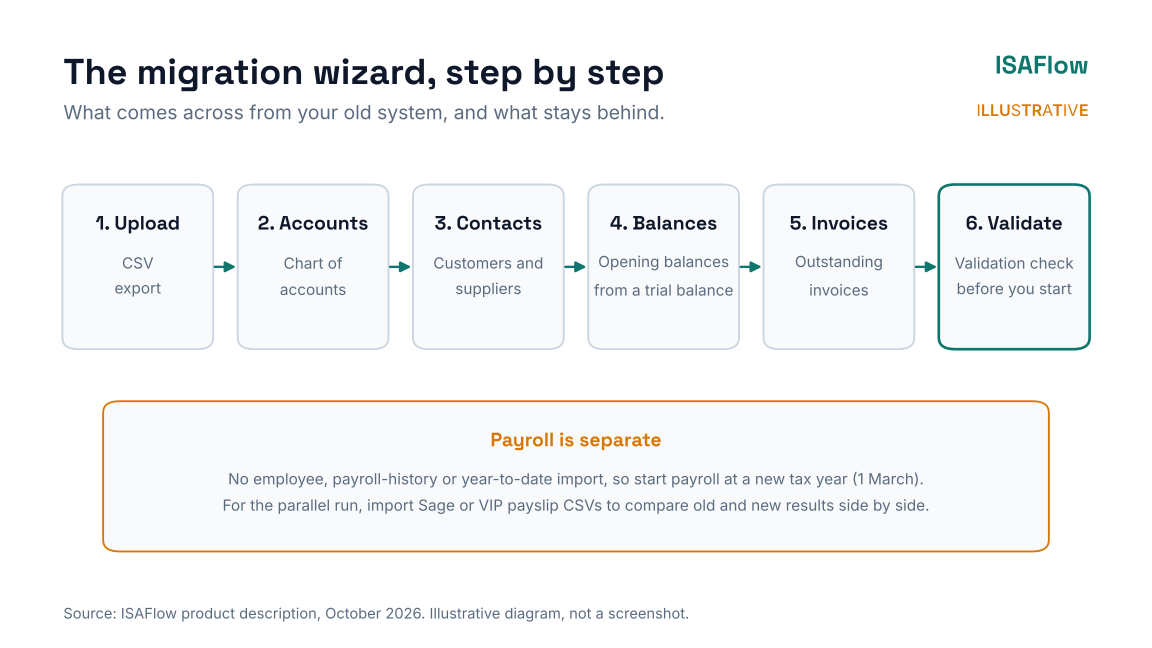
Illustrative diagram, not a screenshot.
Step 3: Keep the old system readable
Leaving history behind is fine as long as you can still produce it. If you've submitted a return, SARS requires the records to be kept for five years from the date you submitted it. Records that are subject to an audit or investigation must be kept until it's concluded, and different periods apply if you've lodged an objection or appeal, or haven't submitted a return you were required to (SARS record keeping).
So:
- keep a read-only copy of the old company data, with the software needed to open it,
- export key reports to PDF: trial balances, general ledgers, VAT reports and payroll reports for each year,
- document where both live and who can get in.
Step 4: Run payroll in parallel once
Run your first payroll on the new system alongside the old one. Compare, employee by employee:
- gross pay,
- PAYE, UIF and SDL,
- ETI, if you claim it,
- net pay.
In ISAFlow, you can import payslip CSVs from Sage or VIP and see the old and new results side by side, which makes this comparison quicker. It's a comparison tool, not a payroll history import.
Differences usually come from tax-table versions or how fringe benefits are set up. Fix them before you pay anyone. Then submit the EMP201 from the new system only. If you need a refresher on that, see the EMP201 due date guide.
Step 5: Check where the data lives
Two legal points matter when your books move off a local machine.
SARS and electronic records
SARS allows records to be kept electronically, but keeping them outside South Africa requires SARS's authorisation under section 30(2) of the Tax Administration Act. You apply by email to [email protected] (SARS record keeping). Ask any cloud provider where its servers are. ISAFlow is hosted in South Africa. If you use its optional AI features, that processing uses a sub-processor outside South Africa, so check it against your own obligations.
POPIA and your provider
Your accounting system holds personal information about employees, customers and suppliers. Under the Protection of Personal Information Act, a provider that processes that information on your behalf is an operator. Section 21 requires a written contract with the operator that ensures it applies the security safeguards in section 19, and the operator must tell you immediately if it believes personal information has been accessed by an unauthorised person (POPIA, gov.za).
Read the provider's data processing terms before you sign.
Step 6: Cut over and switch off
On cutover day:
- Close and back up the old system. Lock it, if it allows.
- Load opening balances in the new system and check the trial balance agrees.
- Reconcile the bank in the new system from the cutover date. Our bank reconciliation routine applies from day one.
- Run the first VAT period in the new system and reconcile the VAT control account to the opening balance. See the VAT201 guide.
Then give it a month before you stop paying for the old licence, but don't delete the data.
For bureaus moving many clients
Don't move 60 clients in one month. Batch them by payroll complexity and VAT category. Start with a few simple clients, write down what went wrong, and use that checklist for the rest. There's more on running a multi-client practice in how to grow a bookkeeping and payroll bureau.
Where ISAFlow fits
The migration wizard brings across your chart of accounts, customers, suppliers, opening balances and outstanding invoices from a CSV export, and checks them before you start. Each company's books are kept separate. Accounting practices get a bureau dashboard across all their clients, set up with you during onboarding. Its payroll engine calculates PAYE, UIF and SDL from versioned SARS tax tables, and payslip CSVs from Sage or VIP can be imported for a side-by-side parallel run.
Start a free trial or contact us for a demo.
FAQ
When is the best time to move accounting software in South Africa?
Switch payroll at the start of a tax year, 1 March. You can move the ledger earlier, in June to August or November to January, to stay clear of the EMP501 reconciliation windows.
Do I need to migrate all my old transactions?
Usually not. Bring opening balances, open invoices and master data, and switch payroll on 1 March so there's no year-to-date to carry across. Keep the old system readable for at least five years.
How long must I keep my old accounting data?
Five years from the date you submitted the return, for most records. If the records are subject to an audit or investigation, keep them until it's concluded. Different periods apply to objections, appeals and returns not yet submitted, so check the SARS record-keeping page.
Can my accounting data be stored outside South Africa?
Only with SARS's authorisation under section 30(2) of the Tax Administration Act for electronic records kept offshore.
What does POPIA require when I use a cloud accounting provider?
A written contract with the provider, as your operator, that makes it apply appropriate security safeguards and notify you of any breach.
Sources
All accessed 27 October 2026.
- SARS: Record keeping
- SARS: Tax calendar
- SARS: Employer Interim Declarations (EMP501), 21 September to 31 October 2026
- SARS: Tax periods for VAT vendors
- South African Government: Protection of Personal Information Act 4 of 2013
This article is general information, not tax, legal or accounting advice.